
 RamTV
RamTV  XazTube
 PageBuilder
Shady theme custom classes
Extra classes the default theme understands
To tweak Shady’s appearance and behavior, you can add custom CSS classes at either the theme level or on individual pages.
Adding Classes at the Theme Level
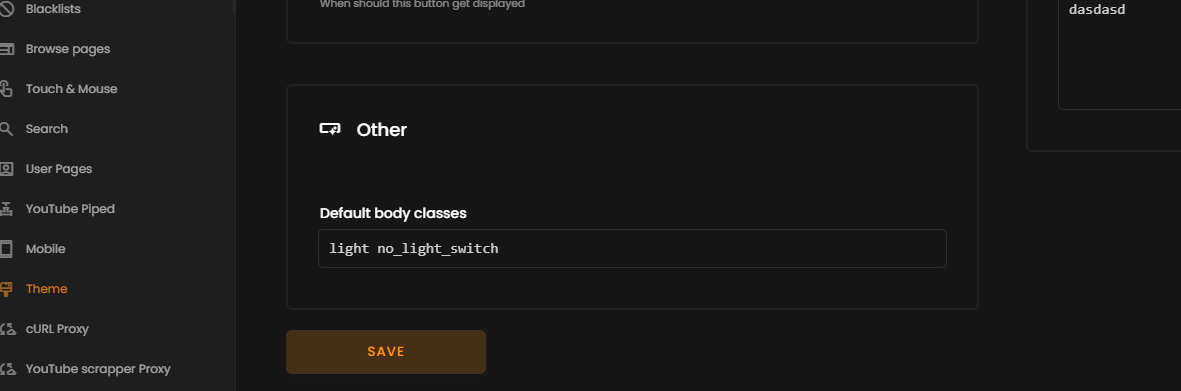
- In your RKHM dashboard, navigate to Admin → Settings → Theme settings
- Locate the Other – Default body classes field.
- Enter one or more CSS class names, separated by spaces, then save.
Adding Classes on a Per-Page Basis
- Open the page you want to edit in PageBuilder.
- Switch to the Settings tab.
- In the CSS Classes field, enter your class name(s), separated by spaces, then save.
Usage Tips
- Combine classes for combined effects: no_sidebar fw_container
- Changes apply immediately after saving in development mode
Class list
| no_sidebar | Removes the sidebar from view |
| no_footer | Hides the footer element |
| fw_container | Maximizes widget width (recommended for use with no_sidebar) |
| no_light_switch | Disables the theme switching toggle |
| light | Sets default color scheme to light mode (white background) |
| hide_muse_sources | Conceals audio source attributions in the player |
| no_bof_alert | Hides all pop-up alerts |