
 RamTV
RamTV  XazTube
 Setup your app
Remove the installer, then configure the app
Make sure you have removed installer folder before moving forward. Installer should not be usable after installation but remove it anyway. Also please make sure you have removed the zip file containing the script. We don't want it to be stolen
Upon vising your website for the first-time, you'll see a blank page with no content what-so-ever. This is normal as you are able to create everything yourself
Visit admin-area by going to https://yourwebsite.com/admin/
Use the email & password you entered during installation to login. First thing you want to do in admin-area is visiting "Setting -> Seo & Brand" and entering your brand name, shortname & upload icon & logos. Upon these changes script will recreate manifest.json which is used by browsers to identify PWAs ( your website becomes installable for users ). Next thing is uploading user-avatar-placeholder & cover-placeholder. Items will not display correctly if there is no cover or fallback-cover provided for them. Also visit "Setting -> Themes -> Theme setting" and define your brand's color
By default, the only defined content-objects for app is Blog. If you plan on using music, podcast, radio, audiobook or etc in your app, go to "Setting -> Plugins" and install the plugins you like. Also visit "Setting -> Tools -> Tool manager" and install any tool that might be useful for your business. Upon installing plugins/tools, the admin-area & client-end become upgraded automatically and you just need to refresh them. More info
Next thing is content. Generally, there are 3 ways to generate content
- Upload them yourself: You can use the admin-area or client-end to upload your content. You can provide different kind of sources such as audio, video, Youtube or SoundCloud. You can share them for free, sell them one by one or offer subscription plans
- Let users upload: Allow user to upload free-content, or upload premium content after they request & get verified on becoming a manager More info. Users can provide different sources as well
- Use APIs to automate: Use Spotify, YouTube, Busyowl's API & etc to fully automate content populating. More info
After generating content, you need to link or display them in your pages. In order to do that, you can use Page Builder. Installing extensions will upgrade Page Builder as well and add related widgets. Use those widgets to display content in different styles. More info. You can also use Menu builder to change menu link/behavior
Development/Production mode
RKHM does a lot of caching on both server & client end. This is extremely useful as it will save bandwidth & resource usage for you & clients alike. But it can be a nuisance during customization or when building your app
To help you with editing, we have added production mode to the app. It disables most of caching done by service worker & etc.
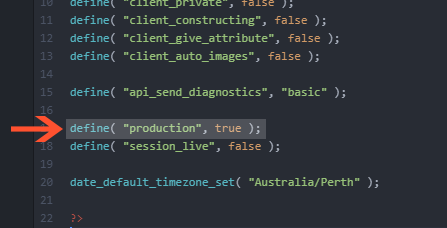
To enable/disable production mode, you need to edit "path_to_rkhm\api\app\config_user.php" and set production to false or true. Leaving production value as "false" will put the script into development mode, resulting in cache being disabled and more logs & errors & reports produced
Users' access are stored in their session record to reduce SQL query count. This means that your changes to Roles might take time to effect for new users. While editing, you can set session_live to true to disable access caching
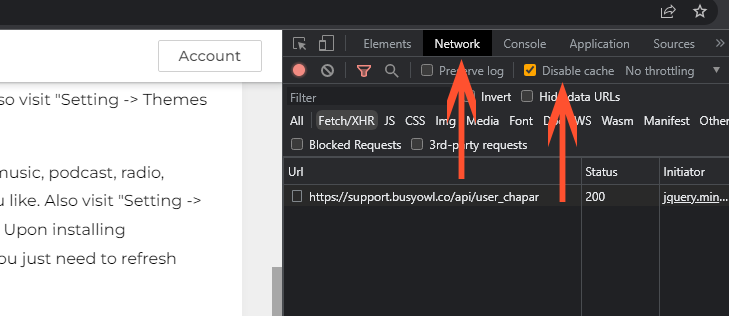
You also need to disable browser's cache during editing. To do that ( in Chrome ), press Ctrl + Shift + I or select Developer tools from More tools in Chrome's menu, select Network tab and check Disable cache
The Incognito feature of Chrome can also be used to test edits
Make sure you set production to true & session_live to false before launching your project
There are something that you better decide and set before starting to publish content
Storages
If you are planning on using third-party servers or services to host your files, set them up before uploading content. You can setup as many storages as you wish and micro manage them but currently we don't offer and solution to move content from 1 storage to another
FFmpeg - HLS Encryption
No matter what you are planning on using RKHM for, we can say with confidence that HLS can help you & your clients. HLS encrypted files are semi-bound to URL address, so you can't change your web-address later. We use FFmpeg to HLS-encrypt files, make sure you test & enable ffmpeg. It's not a requirement but we highly suggest doing it. You don't have to install FFmpeg on your server, static build is already included in the files and there is a 99% chance it will work on your server as well!
Currency
RKHM support multi-currencies but if your main currency differs from USD, we suggest you change it before setting any price. If you change your default currency later, you have to edit all prices as they won't get exchanged automatically
Language
RKHM supports multi-languages as well. If your main language differs from English, change it before editing texts. Language is decided for users based on their IP address or the language they prefer otherwise it will fallback to default language
Session setting
Setting new session-setting might not effect previously-created ones. We suggest you change them before allowing people to user your website
Email setting
Not setting email server setting or setting wrong credentials can cause script to freeze whenever it requires to send an email, for example during password restoration process