
 RamTV
RamTV  XazTube
 Language
Translating the interface, including right-to-left
You can easily make your app multilingual or change primary language from English to something else. In order to customize language, head to your RKHM's admin-area -> Setting -> Languages. You can easily add new language or manage already existing ones there. Not all translations can be done in that page, you may want to translate following as well
PageBuilder
All widget titles can become multilingual. After adding a new language, you can enter multiple titles for widgets. Head to Admin-area -> Setting -> Page Builder -> Edit -> Edit widget
MenuBuilder
Same as PageBuilder, MenuBuilder links titles can have multiple values for different languages. In order to define different title, head to Admin-area -> Setting -> Menu Builder -> Edit -> Edit link
Content
Many content-objects ( such as music-artist, podcaster, music-album, radio-station and etc ) support multiple inputs for different languages. For example an artist can have different names for different languages. Look for "Translation" tab while editing objects in admin-area
SEO
All SEO metatags can have different values for different languages. Just check the "SEO" tab while editing objects in admin-area
Dynamic texts
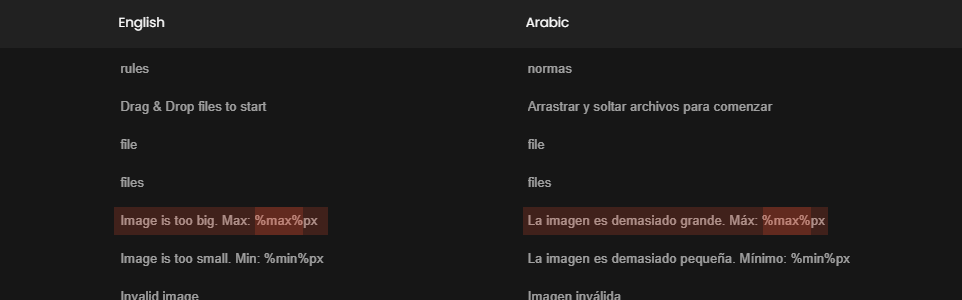
Some texts include dynamic parameters. Script will replace these dynamic parameters with real values while translating the text. All dynamic parameters are surrounded by percentage signs. For example following string:
Hello %username%, welcome to %sitename%
Contains 2 dynamic parameters: username & sitename. If visitor's username was "RawMean" and sitename is "RKHM" the text displayed for visitor would be:
Hello RawMean, welcome to RKHM
The Spanish translation for given example is
Hola %username%, bienvenida a %sitename%
RTL support
All official templates released by Busyowl fully support RTL. You don't have to do anything to activate RTL, just add your language, script will detect RTL languages and do the rest
Notifiactions
All notifications are sent in app's default language. If you wish to change these texts, head to RKHM's admin-area -> Setting ( tab ) -> Setting ( sidebar ) -> Notifications -> click on 3 dots on right, from dropdown menu select edit and edit texts in new page