
 RamTV
RamTV  XazTube
 youtube-dl
Pulling audio from public sources
What is youtube-dl?
YouTube-dl is a command-line tool for downloading videos and playlists from YouTube and many other sites. It allows users to download videos for offline viewing and supports a wide range of platforms and websites.
Do I need youtube-dl?
RKHM is fully functional without youtube-dl. With youtube-dl you can download videos from YouTube and convert those videos to mp3 using FFmpeg then serve the mp3 file instead of video to your users. This process will be done just once for each track as the result mp3 is saved and used for later user requests.
Is youtube-dl legal?
The legality of using YouTube-dl varies by jurisdiction. While the tool itself is not inherently illegal, downloading copyrighted content without permission may violate terms of service on certain platforms. Users should be aware of and comply with local copyright laws and platform policies when using YouTube-dl.
How do I enable youtube-dl?
First, you have to install youtube-dl on your server & fully test it. Then head to `Admin -> Setting -> Cli-apps -> youtube-dl` and enter the path to youtube-dl. Also visit `Admin -> Content -> Music -> Automation` and enable youtube-dl for music-tracks as well
How do I know youtube-dl is working?
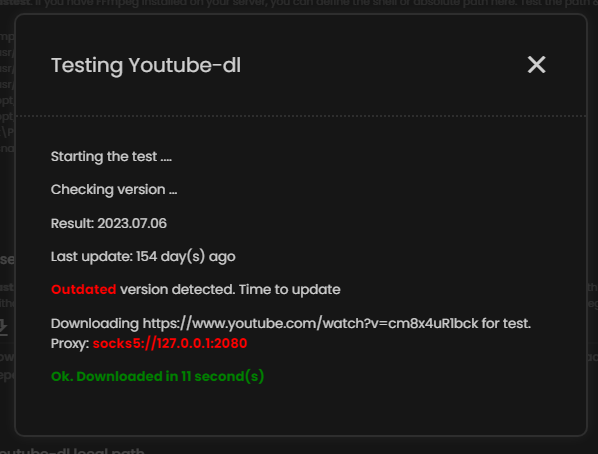
In the cli-apps page, there is a button for testing youtube-dl. Use it
How do I speed-up youtube-dl?
The download and conversion speed of a YouTube video to MP3 largely relies on your server's capabilities. However, users can enhance performance by switching to improved forks of youtube-dl, such as yt-dlp, to achieve faster downloads.
How do i bypass Youtube's limits?
[New in 2.0.69] Pass cookies to your youtube-dl:
Fully documented here by yt-dlp: https://github.com/yt-dlp/yt-dlp/wiki/FAQ#how-do-i-pass-cookies-to-yt-dlp
Open your browser, login to YouTube using an alternative account ( don't use your main account ). Use available browser extension to export your cookies from youtube.com. Rename the file to yt_cookies.php and upload it to ~rkhm/files/protected/yt_cookies.php and check your `CLI setting` page in RKHM

Use a high quality proxy
If you’re running youtube-dl on a VPS, your requests to YouTube default to your server’s datacenter IP address. These IPs are easily flagged by platforms like YouTube, increasing the risk of throttling or blocks. For better stealth and reliability, consider routing traffic through a high-quality residential proxy (configured via CLI settings like --proxy). Alternatively, Cloudflare WARP offers a free, lightweight solution that masks your VPS’s IP with residential-like addresses—it’s surprisingly effective for YouTube scraping and won’t cost you a dime. More info